Global Rush: Online

Build your company in the real world.

Buy real buildings on a map of the whole planet, run the businesses inside them and ship the goods by truck, train, barge and air cargo. One shared world, free in your browser.

Play the open test

Free in your browser with your Steam account. Found a bug? Tell us on Discord.

From one building to a company

The map above plays the loop once, on real streets. In the game you run it in any town you like, as often as your cash allows.

  1. 1Buy a building

    The buildings are real ones from OpenStreetMap. Buy single units or the whole building, then rent them out or open a business inside.

  2. 2Run a business

    Choose from 49 business types, from bakeries and mills to car plants. Hire staff, add fittings and keep the inputs coming.

  3. 3Ship the goods

    Move goods by truck, train, barge or air cargo, or set up routes that run on their own. Trains need a station, barges a harbour.

  4. 4Sell and grow

    Sell to cities, to other players on the exchange or through contracts. Reinvest and climb 15 company tiers, from Sole trader to Legacy.

A whole planet, in your browser

Every town in OpenStreetMap is on the map, with its streets, rivers, fields and buildings. Zoom out from your street to the globe and land anywhere else.

The globe in the lobby of Global Rush: evening over Europe with the lights of its cities, daylight over the Atlantic and the west of Africa.
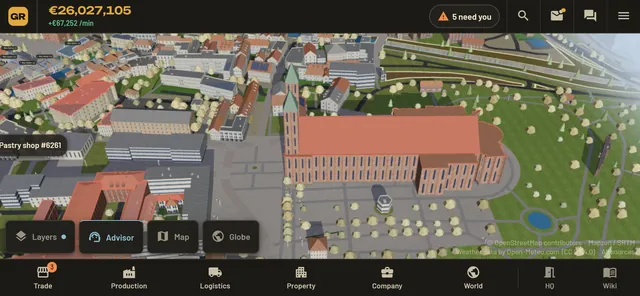
Maximilianstraße in Speyer by day, the old town on both sides and the cathedral at its end.

Day and night on local time

The sun rises and sets on each place's own clock, and the weather comes from live weather data. At night the windows light up one by one.

On a phone or tablet

Hold the device sideways and the game rearranges itself: cash, search and menu along the top, the tools and layers along the bottom, windows almost full screen. Sign in with the same Steam account and your company is there.

Drag
Move the map
Pinch
Zoom
Twist
Turn
Two fingers up or down
Tilt
Tap
Select
Long press
Add land, like Shift+click

Phones and tablets start with lighter graphics. You can turn them up in the settings.

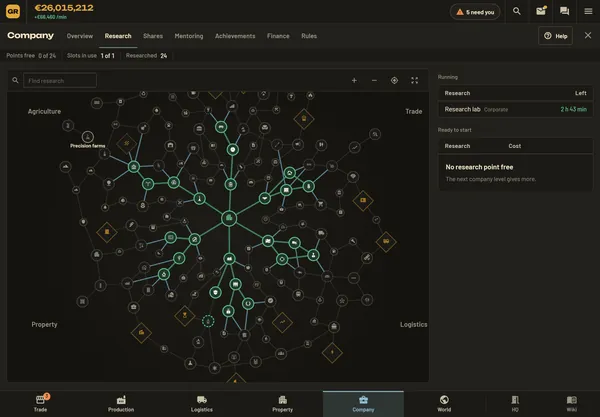
The research map on a tablet held sideways: researched nodes in green around the centre, the running research and its time left beside the map.
Speyer on a phone held sideways: cash, alerts and menu along the top, the areas of the game along the bottom, the cathedral square in the middle.

Everyone plays in the same world

There are no separate servers. Players and AI firms build in one shared economy, so the bakery across the street may belong to a rival.

Exchange
Trade 43 goods on an order book with other players and AI firms.
City markets
22 goods sell straight to cities, and demand follows each city's real population.
Contracts
Cities post delivery jobs with a deadline and a reward.
Auctions
Bid on buildings, land and business licences, foreclosures included.
Shares and takeovers
From the Corporation tier, companies issue and trade shares. One tier up, a majority means control.
World events
Droughts, storms, trade fairs, rail strikes and high water hit real regions for a few hours.
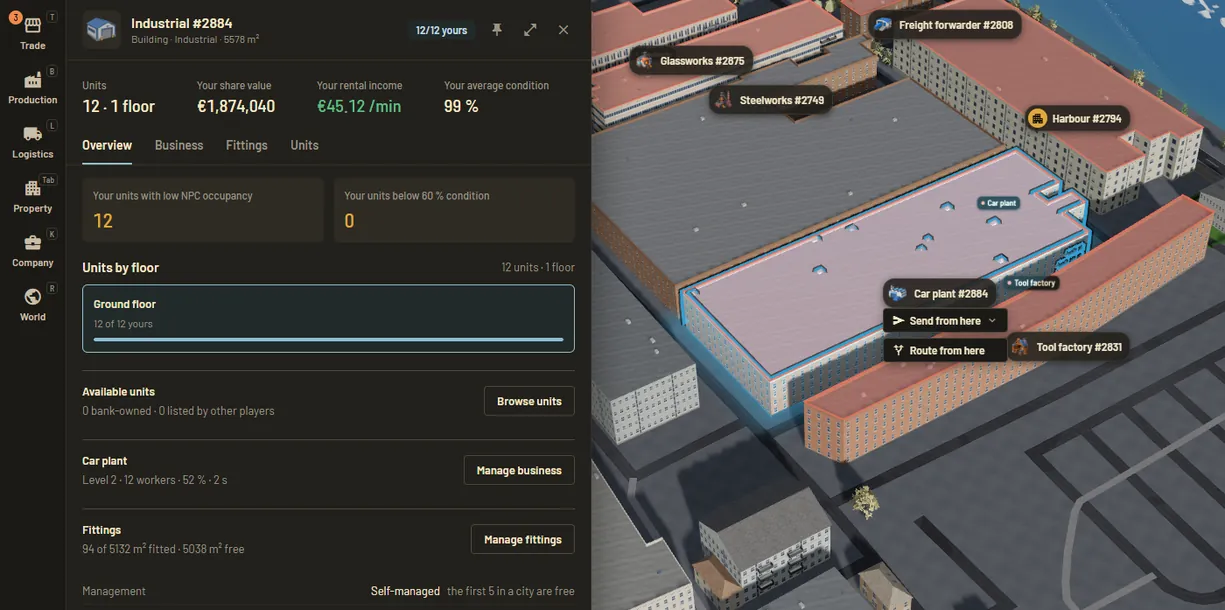
The building inspector for an industrial building in Speyer with a car plant inside: 12 units on one floor, share value, rental income and condition, the business and its fittings, and the building selected on the map among the neighbouring works.
The building inspector: units, rent and condition at a glance.
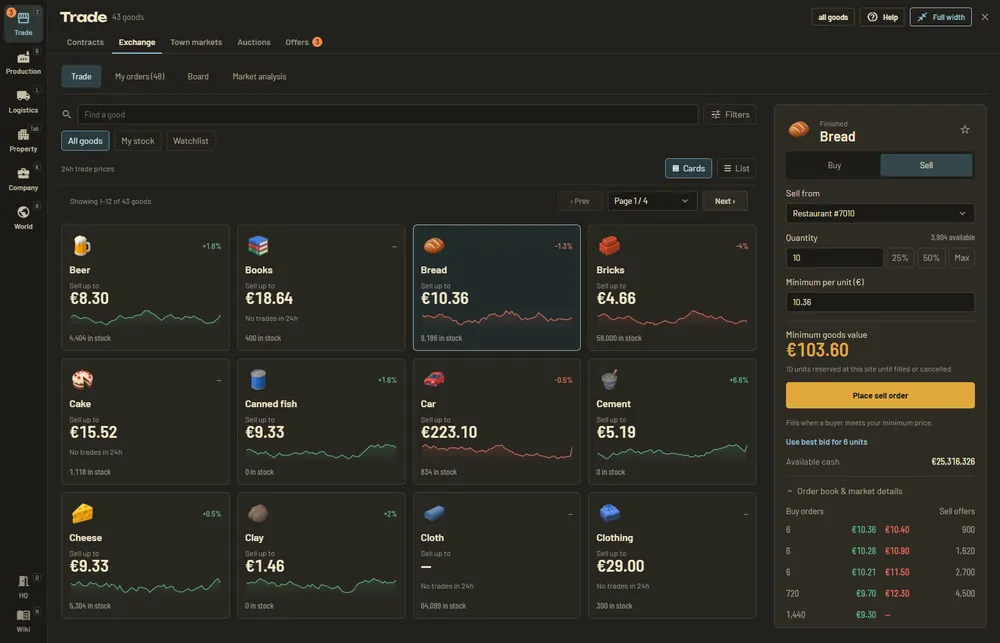
The exchange listing goods such as beer, books, bread and bricks with their prices and price curves, and the order book for bread.
The exchange.

Playing on s&box?

The browser version runs on the same server and in the same world. Sign in with the Steam account you play with on s&box and your company is there, with its buildings, businesses, routes and cash.

The s&box version closes on 1 December 2026.

51 updates since September 2026

Every change you would notice goes into the changelog, sorted into what is new, what got better and what got fixed.

What's new

  • AI firmsFarming AI firms AI firms now buy land near players and grow raw goods such as milk, wheat, wood or wool.
  • AI firmsAI firms move to players an AI firm that has had no players around for about ten days moves to a place where players are, but no earlier than an hour after a new company there starts
  • MapReal air traffic real aircraft now fly over the map around the place you look at, from the open data of adsb.lol, a few seconds to a minute behind.

Questions

What does it cost?

Nothing. Global Rush is free to play, and there is nothing to buy with real money. If you want to support the game anyway, the Buy me a coffee button at the bottom of the page is voluntary and unlocks nothing in the game.

Why do I sign in with Steam?

Your Steam account is your login, so there is no extra password to keep. Steam tells us your Steam ID, and when your account is created we read your public Steam profile name once. We never see your Steam password.

What do I need to play?

A current browser on a computer with mouse and keyboard, or on a phone or tablet held sideways. The game draws a 3D world, so a device from the last few years helps; phones and tablets start with lighter graphics.

Does the world reset?

Yes. A restart of the whole world is announced on this page and in the game's lobby, at least two weeks ahead. Until then the world keeps running, and your company stays until you decide to start over.

Where do I report a bug or a player?

Post it on Discord or send an email to info@priowerk.de. How we handle reports of illegal content is explained in the terms.

Where can I read how things work?

The player wiki explains goods, businesses, logistics and money, with tables built from the game's own numbers.

Pick a town. Start a company.